Data engineering / Tutorial
Orchestrate an Airbyte + dbt Pipeline with Kestra: An End-to-End Walkthrough
Build an automated ELT pipeline that runs an Airbyte sync, waits for completion, executes dbt models, and reports status through Kestra.
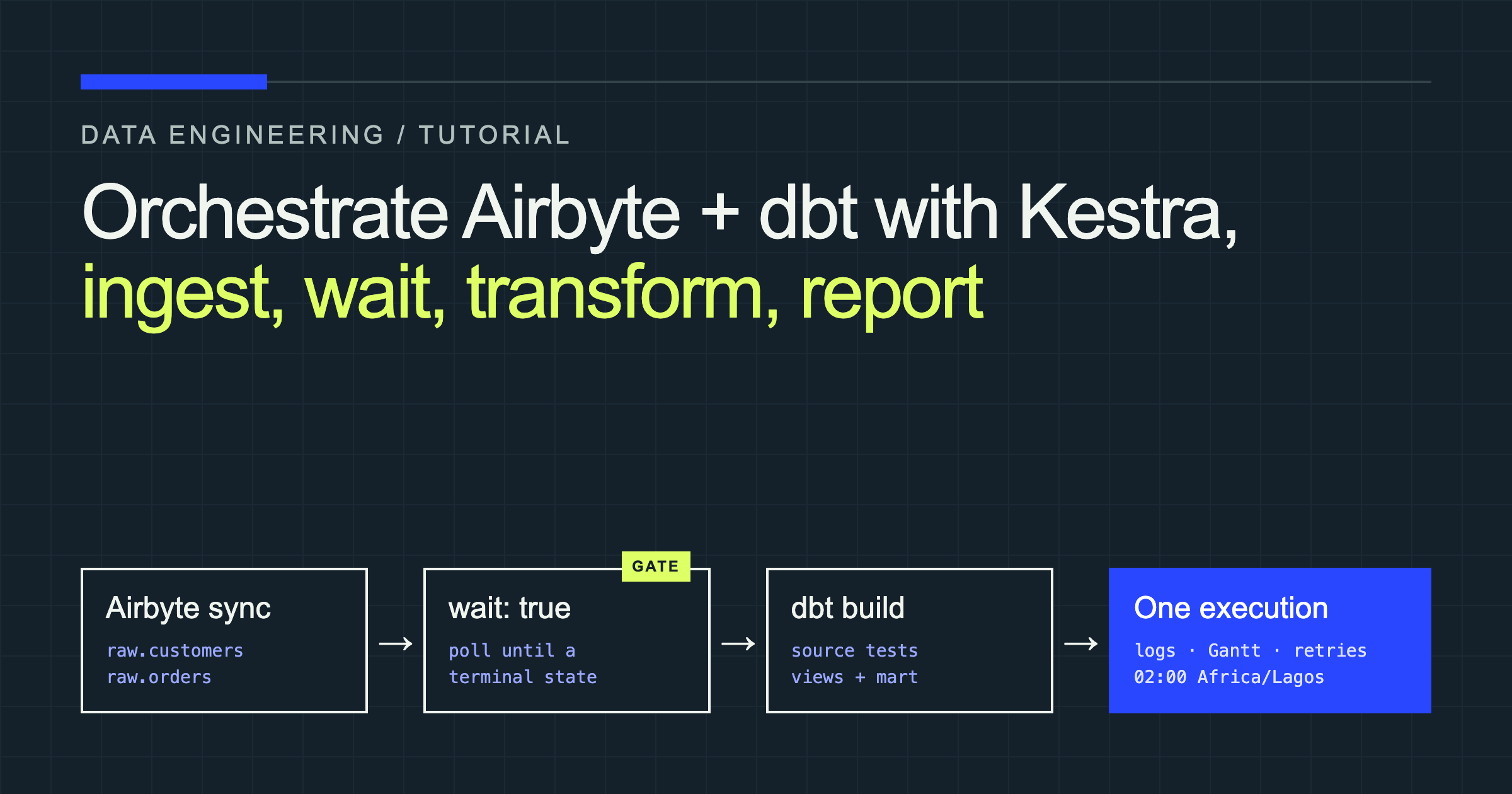
Airbyte can move operational data into a warehouse, and dbt can turn that raw data into trustworthy analytics models. The awkward part is everything between those tools: starting a sync, checking whether it finished, avoiding transformations over partially loaded tables, and finding the right logs when something fails.
That is the orchestration layer. In this tutorial, Kestra will trigger an Airbyte connection, wait for its terminal status, run a dbt build only after ingestion succeeds, and record the result as one observable execution.
You will build a local ELT pipeline with two PostgreSQL databases. Airbyte copies customers and orders from the source into a raw schema in the destination. dbt then creates standardized staging views and an analytics-ready customer_orders table. Kestra controls the dependency, retries transient failures, schedules daily runs, and prevents overlapping executions.
How the ELT pipeline fits together
The pipeline has three separate responsibilities:
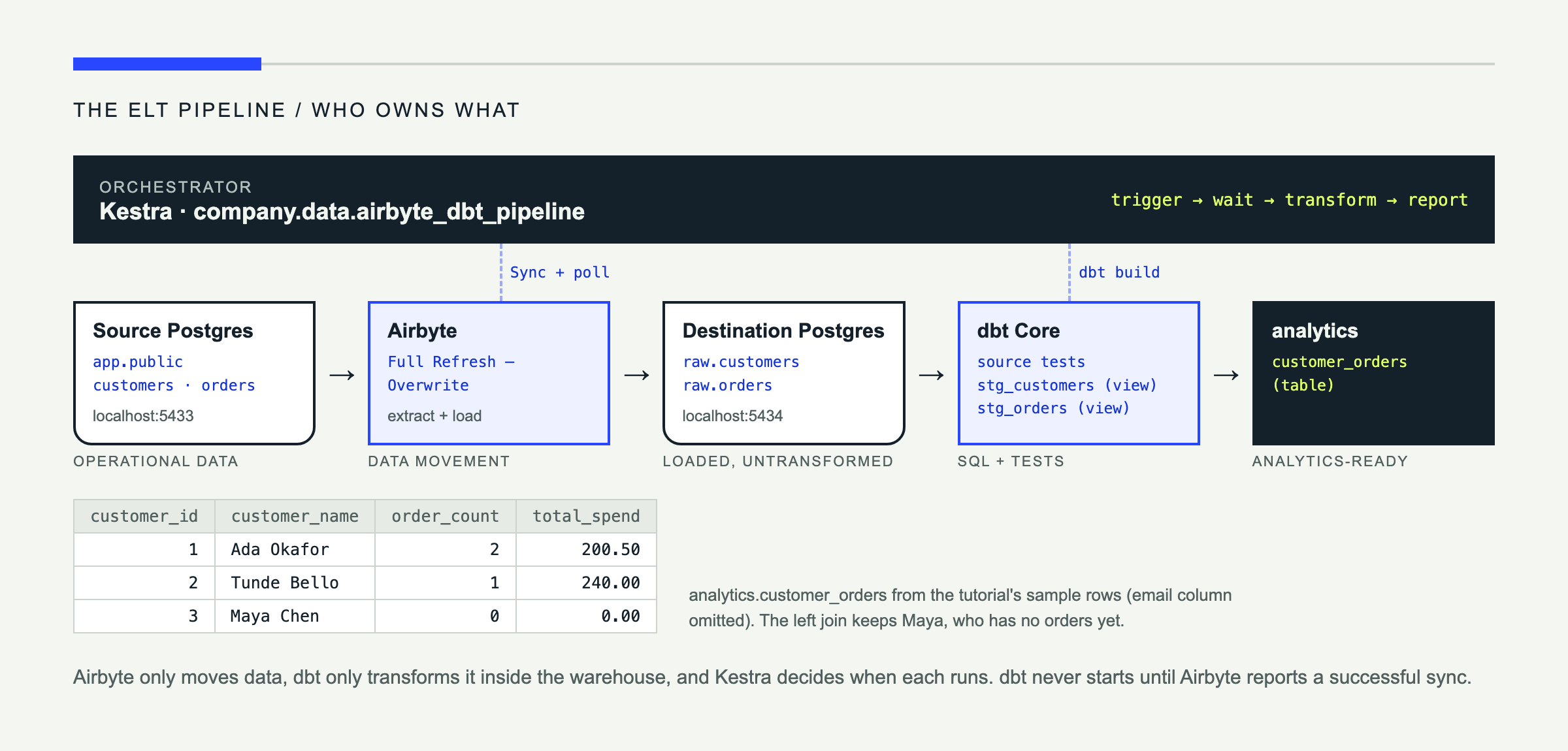
Airbyte owns data movement. dbt owns SQL transformations, tests, and model dependencies. Kestra decides when each operation runs and exposes its status, duration, and logs.
This is ELT rather than ETL: the pipeline extracts records, loads them into the destination, and transforms them there. That ordering preserves raw data and lets the database perform the computational work. It also creates an important dependency: dbt must not start until Airbyte confirms that both streams finished loading successfully.
Prepare the local environment
You need Docker with Docker Compose, psql, basic SQL and YAML familiarity, and enough Docker resources to run Kestra, PostgreSQL, and Airbyte. Airbyte’s local installation uses abctl; it is separate from the Compose stack used below. The current Airbyte quickstart installs it with abctl local install and exposes its UI at http://localhost:8000. Installation can take several minutes. See the official Airbyte OSS quickstart.
The examples target Kestra 2.0.2 or newer, and the task properties used below match Airbyte plugin 1.5.1 and dbt plugin 2.3.0 or later. The standard Kestra image bundles both plugins. The flow does not pin plugin versions per task, because versioned plugins are an Enterprise and Cloud feature.
Create compose.yaml:
name: airbyte-dbt-kestra

networks:
  data_pipeline:
    name: data_pipeline

volumes:
  kestra_db_data:
  kestra_data:
  source_data:
  destination_data:

services:
  kestra_db:
    image: postgres:17
    environment:
      POSTGRES_DB: kestra
      POSTGRES_USER: kestra
      POSTGRES_PASSWORD: kestra
    volumes:
      - kestra_db_data:/var/lib/postgresql/data
    healthcheck:
      test: ["CMD-SHELL", "pg_isready -U kestra -d kestra"]
      interval: 5s
      timeout: 5s
      retries: 10
    networks: [data_pipeline]

  source_db:
    image: postgres:17
    environment:
      POSTGRES_DB: app
      POSTGRES_USER: app
      POSTGRES_PASSWORD: app_password
    ports:
      - "5433:5432"
    volumes:
      - source_data:/var/lib/postgresql/data
      - ./init/source.sql:/docker-entrypoint-initdb.d/01-source.sql:ro
    networks: [data_pipeline]

  destination_db:
    image: postgres:17
    environment:
      POSTGRES_DB: warehouse
      POSTGRES_USER: warehouse
      POSTGRES_PASSWORD: warehouse_password
    ports:
      - "5434:5432"
    volumes:
      - destination_data:/var/lib/postgresql/data
    networks: [data_pipeline]

  kestra:
    image: kestra/kestra:v2.0.2
    user: root
    command: server standalone
    env_file:
      - .env_encoded
    environment:
      KESTRA_CONFIGURATION: |
        datasources:
          postgres:
            url: jdbc:postgresql://kestra_db:5432/kestra
            driverClassName: org.postgresql.Driver
            username: kestra
            password: kestra
        kestra:
          repository:
            type: postgres
          storage:
            type: local
            local:
              base-path: /app/storage
          queue:
            type: postgres
          tasks:
            tmp-dir:
              path: /tmp/kestra-wd/tmp
          url: http://localhost:8080/
    volumes:
      - kestra_data:/app/storage
      - /var/run/docker.sock:/var/run/docker.sock
      - /tmp/kestra-wd:/tmp/kestra-wd
    extra_hosts:
      - "host.docker.internal:host-gateway"
    ports:
      - "8080:8080"
    depends_on:
      kestra_db:
        condition: service_healthy
    networks: [data_pipeline]
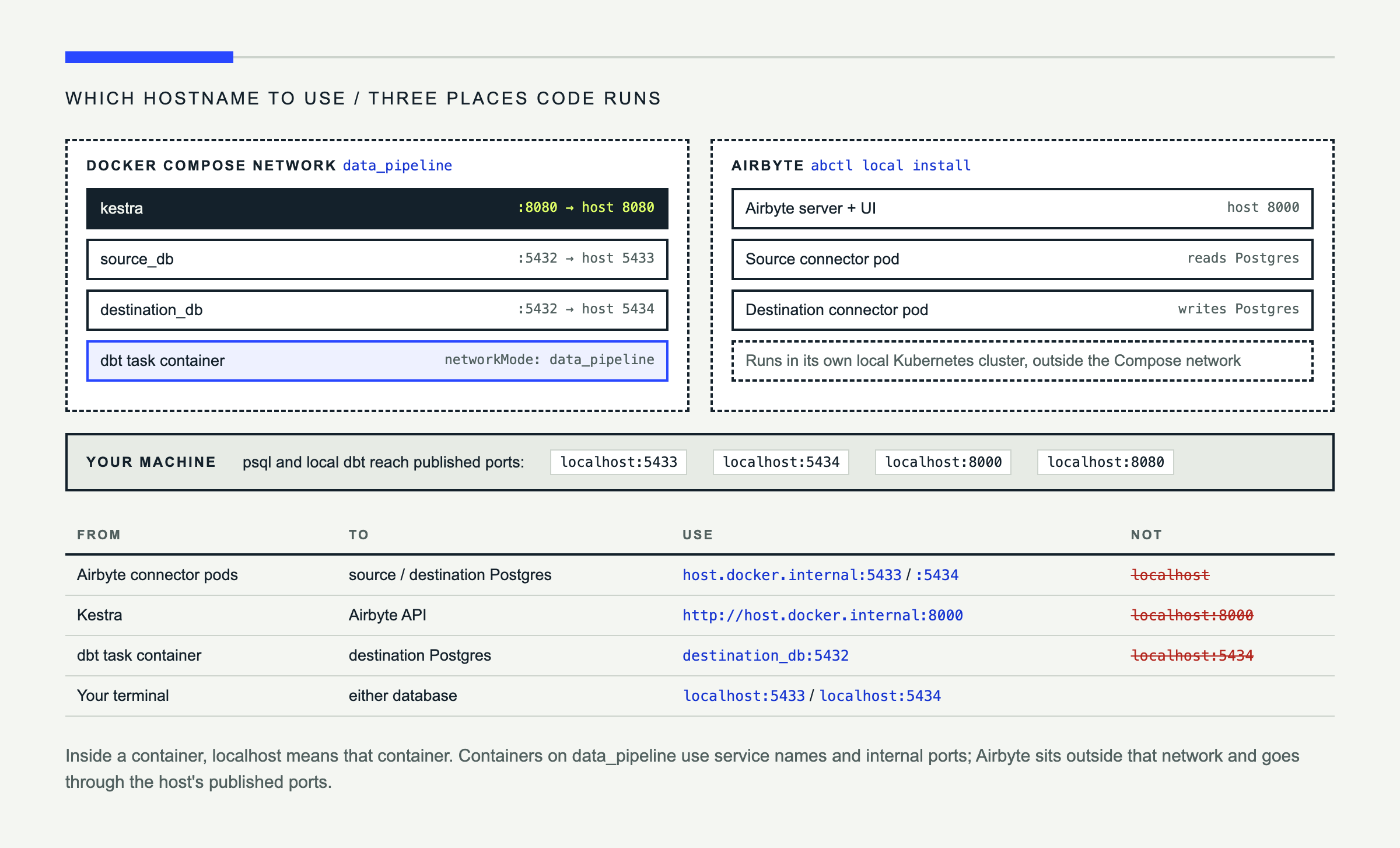
This extends the pattern in Kestra’s official Docker Compose installation with source and destination databases. The named data_pipeline network matters because the dbt task will run in a separate container and join that network.
Create init/source.sql:
create table customers (
  id integer primary key,
  name text not null,
  email text not null
);

create table orders (
  id integer primary key,
  customer_id integer not null references customers(id),
  order_date date not null,
  amount numeric(12, 2) not null
);

insert into customers values
  (1, 'Ada Okafor', 'ada@example.com'),
  (2, 'Tunde Bello', 'tunde@example.com'),
  (3, 'Maya Chen', 'maya@example.com');

insert into orders values
  (101, 1, '2026-10-01', 125.00),
  (102, 1, '2026-10-04', 75.50),
  (103, 2, '2026-10-06', 240.00);
Start the stack and Airbyte:
touch .env_encoded
docker compose up -d
abctl local install
abctl local credentials
The Kestra service reads .env_encoded, and Docker Compose refuses to start if that file is missing, so create it empty now and fill it in later. abctl local credentials prints the Airbyte login email and password, plus a Client-Id and Client-Secret. Keep both pairs: you sign in to the UI with the email and password, and Kestra uses the client credentials to call the Airbyte API.
Open Kestra at http://localhost:8080 and Airbyte at http://localhost:8000.
Configure Airbyte ingestion
In Airbyte, create a PostgreSQL source with these values:
| Setting | Value |
|---|---|
| Host | host.docker.internal |
| Port | 5433 |
| Database | app |
| User | app |
| Password | app_password |
| Schema | public |
Create a separate PostgreSQL destination using port 5434, database and user warehouse, and password warehouse_password. Set its destination namespace or schema to raw. Test both connectors before continuing.
Create a connection, select the customers and orders streams, and use Full Refresh — Overwrite. Full refresh replaces each destination table on every run and keeps this small example predictable. Incremental sync is a better fit when tables are large and the source provides a reliable cursor such as updated_at. The PostgreSQL destination supports both full-refresh and incremental modes, as listed in the Airbyte connector documentation.
Disable Airbyte’s automatic schedule so Kestra is the only scheduler for the complete pipeline. Run one manual sync, then verify the load:
psql postgresql://warehouse:warehouse_password@localhost:5434/warehouse \
  -c "select * from raw.customers;"
Record the connection UUID from the Airbyte connection page URL. Kestra will use it to trigger future syncs.
Build the dbt transformation project
Install the PostgreSQL adapter for local development:
python -m pip install dbt-postgresThe dbt PostgreSQL setup guide documents the same adapter and profile fields. Create this project:
analytics/
├── dbt_project.yml
├── profiles.yml
└── models/
    ├── sources.yml
    ├── staging/
    │   ├── stg_customers.sql
    │   └── stg_orders.sql
    └── marts/
        └── customer_orders.sql
Configure the project:
name: analytics
version: 1.0.0
config-version: 2
profile: analytics
model-paths: ["models"]

models:
  analytics:
    staging:
      +materialized: view
    marts:
      +materialized: table
For local commands, add analytics/profiles.yml:
analytics:
  target: dev
  outputs:
    dev:
      type: postgres
      host: localhost
      port: 5434
      user: warehouse
      password: "{{ env_var('DBT_POSTGRES_PASSWORD') }}"
      dbname: warehouse
      schema: analytics
      threads: 4
Define the ingested tables and basic assertions:
version: 2

sources:
  - name: airbyte_raw
    schema: raw
    tables:
      - name: customers
        columns:
          - name: id
            data_tests: [not_null, unique]
      - name: orders
        columns:
          - name: id
            data_tests: [not_null, unique]
          - name: customer_id
            data_tests: [not_null]
Standardize the source columns in staging models:
select
  id::integer as customer_id,
  trim(name) as customer_name,
  lower(email) as email
from {{ source('airbyte_raw', 'customers') }}select
id::integer as order_id,
customer_id::integer as customer_id,
order_date::date as order_date,
amount::numeric(12, 2) as amount
from {{ source('airbyte_raw', 'orders') }}Build the analytics model:
select
  c.customer_id,
  c.customer_name,
  c.email,
  count(o.order_id) as order_count,
  coalesce(sum(o.amount), 0)::numeric(12, 2) as total_spend
from {{ ref('stg_customers') }} as c
left join {{ ref('stg_orders') }} as o
  on c.customer_id = o.customer_id
group by 1, 2, 3
ref() tells dbt that the mart depends on both staging models, so dbt builds them first. Validate the project locally:
export DBT_POSTGRES_PASSWORD=warehouse_password
cd analytics
dbt run --profiles-dir .
dbt test --profiles-dir .
dbt run materializes the models; dbt test evaluates the declared uniqueness and null checks. The Kestra flow will use dbt build, which performs both operations in dependency order.
Orchestrate Airbyte and dbt with Kestra
First, make the dbt project available to the task runtime. In Kestra, open the company.data namespace’s Files view and upload the entire analytics directory. Namespace Files are injected into the dbt task’s working directory.
For Kestra Open Source, secrets are base64-encoded environment variables prefixed with SECRET_. Fill in the uncommitted .env_encoded file you created earlier, using the client credentials from abctl local credentials:
SECRET_AIRBYTE_CLIENT_ID=BASE64_ENCODED_CLIENT_ID
SECRET_AIRBYTE_CLIENT_SECRET=BASE64_ENCODED_CLIENT_SECRET
SECRET_WAREHOUSE_PASSWORD=d2FyZWhvdXNlX3Bhc3N3b3Jk
Airbyte’s API uses application tokens rather than your UI password. Kestra exchanges the client ID and secret for a short-lived access token on each run, so you never store a token that expires. See Airbyte’s API access guide.
Generate each value with echo -n 'value' | base64, then restart Kestra with docker compose up -d. The flow references them without the SECRET_ prefix through secret(). Base64 is not encryption, so keep this file out of version control. Kestra’s OSS secrets guide explains this mechanism.
Create and publish the following flow, replacing the Airbyte connection ID:
id: airbyte_dbt_pipeline
namespace: company.data

description: Ingest customers and orders with Airbyte, then build dbt models.

concurrency:
  limit: 1
  behavior: QUEUE

tasks:
  - id: sync_raw_data
    type: io.kestra.plugin.airbyte.connections.Sync
    url: http://host.docker.internal:8000
    applicationCredentials:
      clientId: "{{ secret('AIRBYTE_CLIENT_ID') }}"
      clientSecret: "{{ secret('AIRBYTE_CLIENT_SECRET') }}"
    connectionId: REPLACE_WITH_AIRBYTE_CONNECTION_ID
    wait: true
    pollFrequency: PT5S
    maxDuration: PT30M
    retry:
      type: exponential
      interval: PT10S
      maxInterval: PT1M
      maxAttempts: 3

  - id: build_analytics_models
    type: io.kestra.plugin.dbt.cli.DbtCLI
    containerImage: ghcr.io/kestra-io/dbt-postgres:latest
    projectDir: analytics
    namespaceFiles:
      enabled: true
      exclude:
        - analytics/profiles.yml
    taskRunner:
      type: io.kestra.plugin.scripts.runner.docker.Docker
      networkMode: data_pipeline
    commands:
      - dbt build --target prod
    profiles: |
      analytics:
        target: prod
        outputs:
          prod:
            type: postgres
            host: destination_db
            port: 5432
            user: warehouse
            password: "{{ secret('WAREHOUSE_PASSWORD') }}"
            dbname: warehouse
            schema: analytics
            threads: 4

  - id: report_success
    type: io.kestra.plugin.core.log.Log
    message: >-
      Pipeline {{ execution.id }} completed: Airbyte ingestion and dbt build succeeded.

errors:
  - id: report_failure
    type: io.kestra.plugin.core.log.Log
    level: ERROR
    message: >-
      Pipeline {{ execution.id }} failed. Inspect the failed task logs in Kestra.

triggers:
  - id: daily_sync
    type: io.kestra.plugin.core.trigger.Schedule
    cron: "0 2 * * *"
    timezone: Africa/Lagos
    allowConcurrent: false
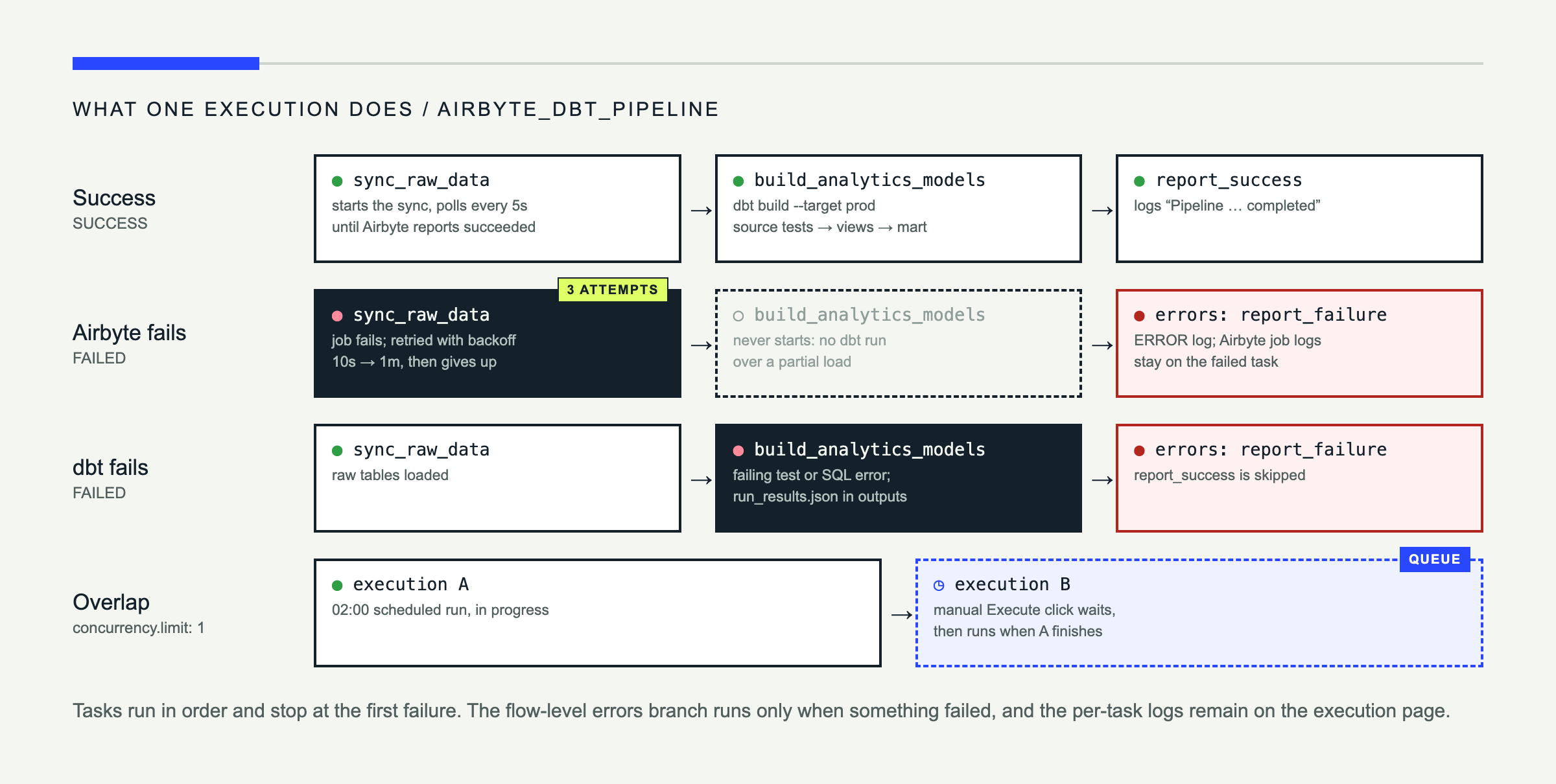
The flow ID identifies this automation inside company.data; each item under tasks runs sequentially. The Airbyte Sync task starts the connection and waits by default, but wait: true makes the dependency explicit. According to the current Kestra Airbyte plugin reference, it polls until a terminal state and fails when the sync fails. Kestra therefore never starts dbt against an incomplete load.
The retry applies only to the sync task and is intended for temporary API or network failures. Avoid blindly retrying permanent connector errors or non-idempotent operations.
The dbt task injects the namespace files, excludes the local profile, and supplies a runtime profile containing a Kestra secret. Its Docker runner joins data_pipeline, allowing destination_db to resolve. The PostgreSQL-ready container provides dbt Core and its adapter. The Kestra dbt task reference confirms that DbtCLI runs commands in a configurable container and parses run_results.json for execution output.
If either main task fails, later tasks do not run. The flow-level errors task records the failed execution, while the execution page retains the detailed Airbyte or dbt logs.
Run, schedule, and monitor the pipeline
Publish the flow and click Execute for the first run. In the execution view, follow sync_raw_data, build_analytics_models, and report_success. After completion, verify the mart:
psql postgresql://warehouse:warehouse_password@localhost:5434/warehouse \
  -c "select * from analytics.customer_orders order by customer_id;"
The schedule runs at 02:00 in the declared Africa/Lagos timezone. If timezone is omitted, Kestra evaluates the cron expression in the server’s timezone, which is usually UTC in containers, so make the intended business timezone explicit. The schedule trigger documentation describes both behaviors.
Use Kestra’s execution history, Gantt view, and task logs to compare durations and locate failures. concurrency.limit: 1 prevents manual and scheduled runs from modifying the same raw tables simultaneously; additional executions queue until the active one finishes.
Troubleshooting and production practices
| Issue | Likely cause | Resolution |
|---|---|---|
| Airbyte connection fails | Wrong credentials or unreachable host | Retest the connector and replace localhost with a reachable host address |
sync_raw_data returns 401 | Using the UI email and password, or wrong client credentials | Re-run abctl local credentials and re-encode the Client-Id and Client-Secret |
| Airbyte sync never completes | Source or destination job error | Open the Airbyte job and inspect its connector logs |
| dbt cannot find source tables | Schema or stream-name mismatch | Inspect raw and update sources.yml to match actual tables |
| dbt connection fails | Wrong credentials or Docker network | Check the inline profile and networkMode |
| Kestra rejects the flow | Incompatible plugin or invalid property | Confirm the stated Kestra/plugin versions and use editor validation |
Keep flow definitions and dbt models in version control, but keep credentials out. Prefer idempotent dbt models, apply retries only to transient failures, pin container and plugin versions after validating them, and separate development and production databases. In production, replace local base64 environment secrets with an appropriate secrets backend, add failure notifications, and define freshness or row-count checks before downstream consumers run.
One execution for the complete ELT chain
You now have a complete pipeline: Airbyte loads operational PostgreSQL data into a raw destination schema, dbt transforms it into a tested customer-order mart, and Kestra coordinates the dependency, schedule, retries, concurrency, and logs.
The important result is not merely that all three tools run. It is that they run in the correct order and produce one operational record of the entire pipeline.
From here, add incremental Airbyte syncs, more dbt tests, alerting, additional sources, or a cloud warehouse. The orchestration pattern remains the same: ingest, wait for confirmed success, transform, validate, and report.