APIs & developer platforms / Tutorial
OAuth 2.0 with PKCE, Step by Step: The Flow Your SPA Actually Runs
Walk the authorization code flow with PKCE exactly as a browser app runs it, including the verifier math, state checks, and token storage decisions.
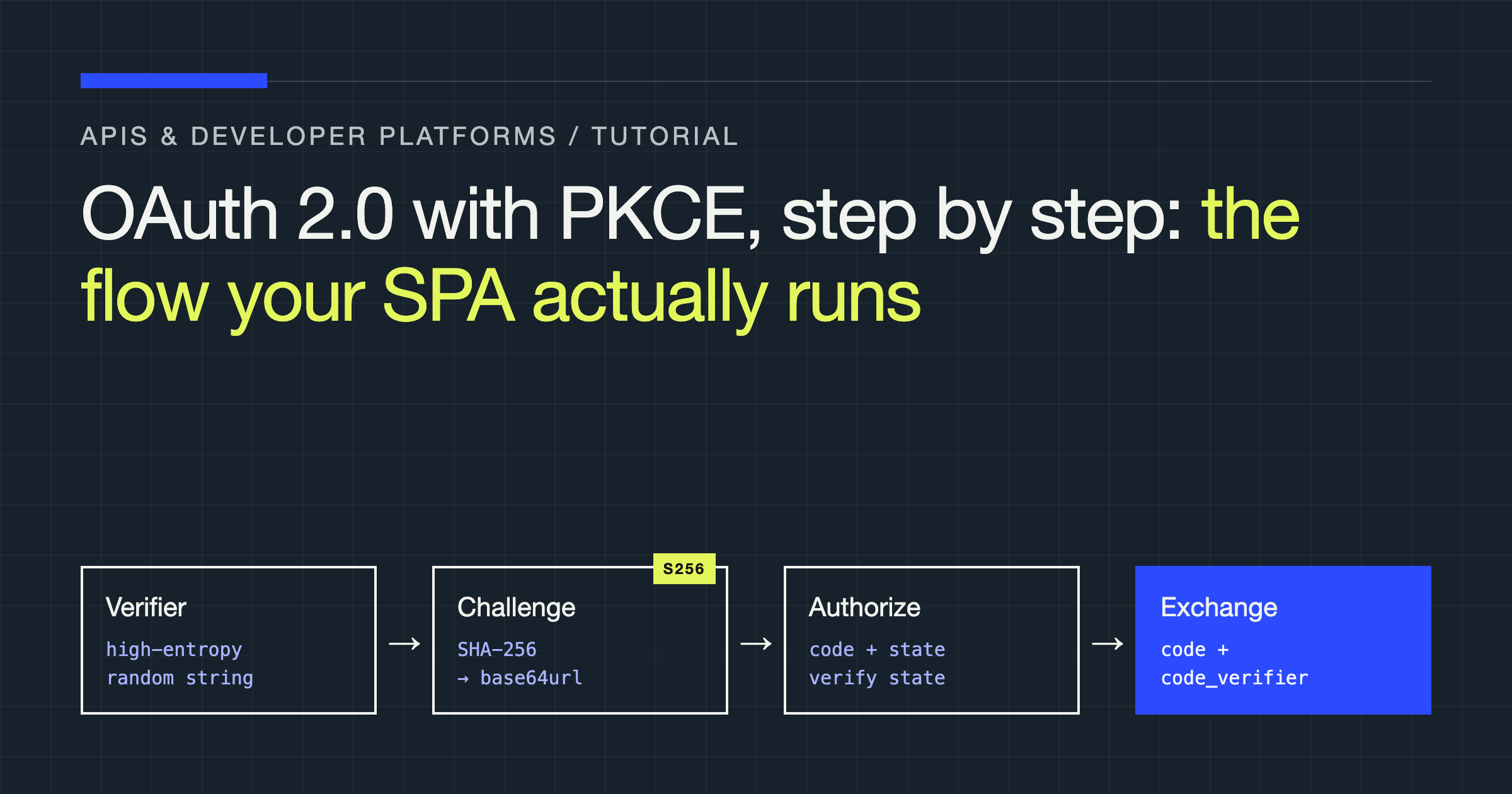
You will run the authorization code flow with PKCE exactly as your single-page application runs it, step by step, and you will understand what each parameter stops an attacker from doing. By the end you will be able to generate a verifier and challenge correctly, defend the redirect, exchange the code safely, and make a deliberate decision about where tokens live.
PKCE, pronounced “pixy”, stands for Proof Key for Code Exchange. It was designed for public clients, applications that cannot keep a secret. A browser app is the clearest example. Everything you ship to the browser can be read by anyone who opens developer tools, so a client secret embedded in your JavaScript is not a secret at all. The original authorization code flow assumed a confidential server that could authenticate itself when exchanging a code for tokens. Your SPA cannot. PKCE replaces that missing secret with a fresh, one-time proof generated per login attempt.
The problem PKCE solves, in one attack
Imagine your app redirects the user to the authorization server. The user signs in and approves. The server redirects back to your app with a short-lived authorization code in the URL. Your app then exchanges that code for tokens.
Now imagine that code is intercepted. This is not hypothetical on mobile, where a malicious app can register the same custom URL scheme and receive the redirect, and it is a real concern anywhere a redirect URL leaks through logs, browser history, or a compromised component. Whoever holds the code holds the login, because in the plain flow the code alone is enough to exchange.
PKCE breaks that. Before redirecting, your app invents a secret that never leaves the device during the first leg. It sends only a hashed fingerprint of that secret to the authorization server. When exchanging the code, your app presents the original secret. The server hashes it, compares it with the fingerprint it stored, and only then issues tokens. An intercepted code is now useless on its own, because the attacker does not have the secret that matches the fingerprint.
Step 1: generate the verifier and the challenge
The code verifier is a high-entropy random string. The code challenge is derived from it. Generate both in the browser with the Web Crypto API, never with a predictable random source.
// Characters allowed in a code verifier.
const CHARSET =
  "ABCDEFGHIJKLMNOPQRSTUVWXYZabcdefghijklmnopqrstuvwxyz0123456789-._~";

export function generateCodeVerifier(length = 64): string {
  if (length < 43 || length > 128) {
    throw new Error("Code verifier length must be between 43 and 128");
  }
  const randomValues = new Uint32Array(length);
  crypto.getRandomValues(randomValues);
  return Array.from(randomValues, (v) => CHARSET[v % CHARSET.length]).join("");
}

function base64UrlEncode(buffer: ArrayBuffer): string {
  const bytes = new Uint8Array(buffer);
  let binary = "";
  bytes.forEach((b) => (binary += String.fromCharCode(b)));
  return btoa(binary)
    .replace(/\+/g, "-")
    .replace(/\//g, "_")
    .replace(/=+$/, "");
}

export async function generateCodeChallenge(verifier: string): Promise<string> {
  const encoded = new TextEncoder().encode(verifier);
  const digest = await crypto.subtle.digest("SHA-256", encoded);
  return base64UrlEncode(digest);
}
Two details here matter more than they look. First, the length bounds are not a suggestion. A verifier shorter than the minimum does not give the proof enough entropy, and authorization servers are entitled to reject it. Second, the challenge encoding is base64url without padding. Ordinary base64 will produce characters that break URL handling and will not match what the server computes. Servers compare exact strings, not equivalent ones.
Store the verifier in session storage for the duration of the flow. You need it after the redirect returns, in the same browser tab. Session storage fits because it survives the redirect within the tab, is not shared across tabs, and is cleared when the tab closes. Do not store the verifier in a cookie, where it would be sent on unrelated requests, and do not store it in local storage, where it would linger long after the login attempt that created it.
Step 2: build the authorization request
Generate a state value as well. State is a separate defence with a separate job, and skipping it because you have PKCE is a common and serious mistake. PKCE proves the party exchanging the code is the party that started the flow. State proves the redirect arriving in your app belongs to a flow your app actually started, which is what stops login cross-site request forgery, where an attacker starts a flow with their own account and tricks a victim’s browser into completing it.
Generate state the same way you generated the verifier, store it alongside the verifier, and send both state and challenge in the authorization URL.
import { generateCodeVerifier, generateCodeChallenge } from "./pkce";

export async function startLogin(): Promise<void> {
  const verifier = generateCodeVerifier();
  const challenge = await generateCodeChallenge(verifier);
  const state = generateCodeVerifier(32 + 11); // random, opaque to the app

  sessionStorage.setItem("pkce_verifier", verifier);
  sessionStorage.setItem("oauth_state", state);

  const params = new URLSearchParams({
    response_type: "code",
    client_id: "your-public-client-id",
    redirect_uri: "https://app.example.com/auth/callback",
    scope: "openid profile",
    state,
    code_challenge: challenge,
    code_challenge_method: "S256",
  });

  window.location.assign(
    `https://auth.example.com/authorize?${params.toString()}`
  );
}
Your redirect URI must match exactly what is registered with the authorization server, including the trailing path. Servers compare redirect URIs as strings for good reason: a loose match is an open redirect waiting to be abused. Register the exact URIs you need, one per environment, and never use a wildcard in production.
Request only the scopes you use. Narrow scopes limit the damage if a token is ever exposed, they make the consent screen shorter and more understandable, and they make it far more likely a user completes the flow instead of abandoning it at a wall of permissions.
Step 3: handle the callback and verify everything
The authorization server redirects back with either a code and state, or an error. Handle the error branch first. If the user denied consent or the server rejected the request, your callback receives error parameters, not a code, and your app should show a recoverable message rather than spinning forever on a loader.
Then compare the returned state with the value you stored, exactly, before doing anything else. If they differ, or if there is no stored state, stop. Do not exchange the code. Clear the stored values and return the user to the start of the flow with a plain explanation. A state mismatch means the response did not originate from your request, and proceeding anyway is how login forgery attacks succeed.
export async function handleCallback(): Promise<void> {
  const params = new URLSearchParams(window.location.search);

  const error = params.get("error");
  if (error) {
    throw new Error(`Authorization failed: ${error}`);
  }

  const code = params.get("code");
  const returnedState = params.get("state");
  const expectedState = sessionStorage.getItem("oauth_state");
  const verifier = sessionStorage.getItem("pkce_verifier");

  if (!code || !verifier || !expectedState || returnedState !== expectedState) {
    throw new Error("Invalid callback: state or verifier check failed");
  }

  // Single use. Clear before the exchange so a refresh cannot replay it.
  sessionStorage.removeItem("oauth_state");
  sessionStorage.removeItem("pkce_verifier");

  const tokens = await exchangeCodeForTokens(code, verifier);
  storeTokensDeliberately(tokens);
}
Clear the verifier and state before the exchange, not after. Authorization codes are single-use and short-lived, and your stored proof should have the same property. If the exchange fails and the user needs to sign in again, start a fresh flow with a fresh verifier rather than resurrecting the old one.
Remove the code from the URL once you have read it, using the history API to replace the current entry. Codes left in the address bar end up in browser history, screenshots, and any analytics tool that records full URLs. Treat the callback URL as contaminated once you have consumed it.
Step 4: exchange the code
The exchange is a direct POST from the browser to the token endpoint. Note what is absent: no client secret. The verifier is your proof instead.
type TokenResponse = {
  access_token: string;
  token_type: string;
  expires_in: number;
  refresh_token?: string;
  id_token?: string;
  scope?: string;
};

export async function exchangeCodeForTokens(
  code: string,
  verifier: string
): Promise<TokenResponse> {
  const body = new URLSearchParams({
    grant_type: "authorization_code",
    code,
    redirect_uri: "https://app.example.com/auth/callback",
    client_id: "your-public-client-id",
    code_verifier: verifier,
  });

  const response = await fetch("https://auth.example.com/token", {
    method: "POST",
    headers: { "Content-Type": "application/x-www-form-urlencoded" },
    body,
  });

  if (!response.ok) {
    const detail = await response.text();
    throw new Error(`Token exchange failed: ${detail}`);
  }

  return (await response.json()) as TokenResponse;
}
The redirect URI in this request must be identical to the one in the authorization request, or the exchange fails. This repetition is deliberate. It binds the exchange to the same destination the code was issued for.
If the server returns an invalid grant error here, the usual causes are a reused code, an expired code, or a verifier that does not match the challenge. Do not retry the same code in a loop. Codes do not become valid again. Send the user through a fresh flow.
Where the tokens go, and the honest tradeoffs
You now hold an access token, and possibly a refresh token and an ID token. Where you store them determines your exposure to two different attack classes, and there is no option that wins on both.
| Storage | Survives reload | Exposed to script on the page | Sent automatically |
|---|---|---|---|
| In memory only | No | Only while running, not at rest | No |
| Session storage | Yes, per tab | Yes, any script in the origin can read it | No |
| Local storage | Yes | Yes, any script in the origin can read it | No |
| HttpOnly cookie set by a backend | Yes | No | Yes, so CSRF defences are required |
Any token readable by JavaScript is stealable by any JavaScript running in your origin, which includes every third-party script you load. That is the cross-site scripting risk, and it is why storing refresh tokens in browser storage is difficult to defend. A stolen long-lived refresh token is a durable compromise, not a brief one.
The strongest pattern for a serious application is a backend-for-frontend. Your SPA talks only to your own backend, the backend holds tokens server-side and sets a secure, HttpOnly, SameSite session cookie, and no token is ever readable by browser code. That moves the problem to your server, where secrets belong, at the cost of running and scaling that backend and defending the cookie against cross-site request forgery.
If you have no backend and store tokens in the browser, keep access tokens in memory or session storage, keep their lifetime short, avoid refresh tokens in storage entirely or use them only with rotation and reuse detection from your authorization server, and be ruthless about third-party scripts. Rotation with reuse detection matters because it turns a stolen refresh token into a detectable event: when an old token is presented after a new one was issued, the server can revoke the whole family.
Failure modes worth testing before you ship
- Clock and tab behaviour. A user who starts login in one tab and completes it in another will fail the state check, because session storage is per tab. Decide whether that frustration is acceptable or whether your flow needs to guide the user back to the original tab.
- Blocked storage. Private browsing modes and strict browser settings can restrict storage. Detect a failed write when you store the verifier, and show a real error instead of letting the callback fail mysteriously.
- Back button after login. If the callback URL stays in history, the back button can land the user on a consumed code. Replacing the history entry and handling an already-exchanged code gracefully prevents a broken dead end.
- Silent renewal assumptions. Access tokens expire during a session. Plan for a 401 from your API as a normal event: attempt renewal if your design supports it, otherwise route to a fresh login without discarding the user’s unsaved work where you can avoid it.
Verdict
Implement PKCE with the S256 method, generate the verifier with a cryptographic random source at a valid length, pair it with an independently generated state value you check exactly, and clear both after a single use. That is the flow itself, and none of it is optional decoration.
Then make your token storage decision with your eyes open. If the application matters, use a backend-for-frontend and keep tokens out of the browser entirely. If you store tokens in the browser, keep them short-lived, treat refresh tokens as the sensitive assets they are, and minimise the script running in your origin. The flow protects the code. Only your storage decision protects what the code buys.