AI developer tooling / Tutorial
Structured Outputs from LLM APIs: Schemas, Retries, and the Failure Modes Nobody Documents
Get reliably typed data out of LLM APIs: strict schemas, parser-backed validation, retry loops that fix errors, and the failure modes that survive all three.
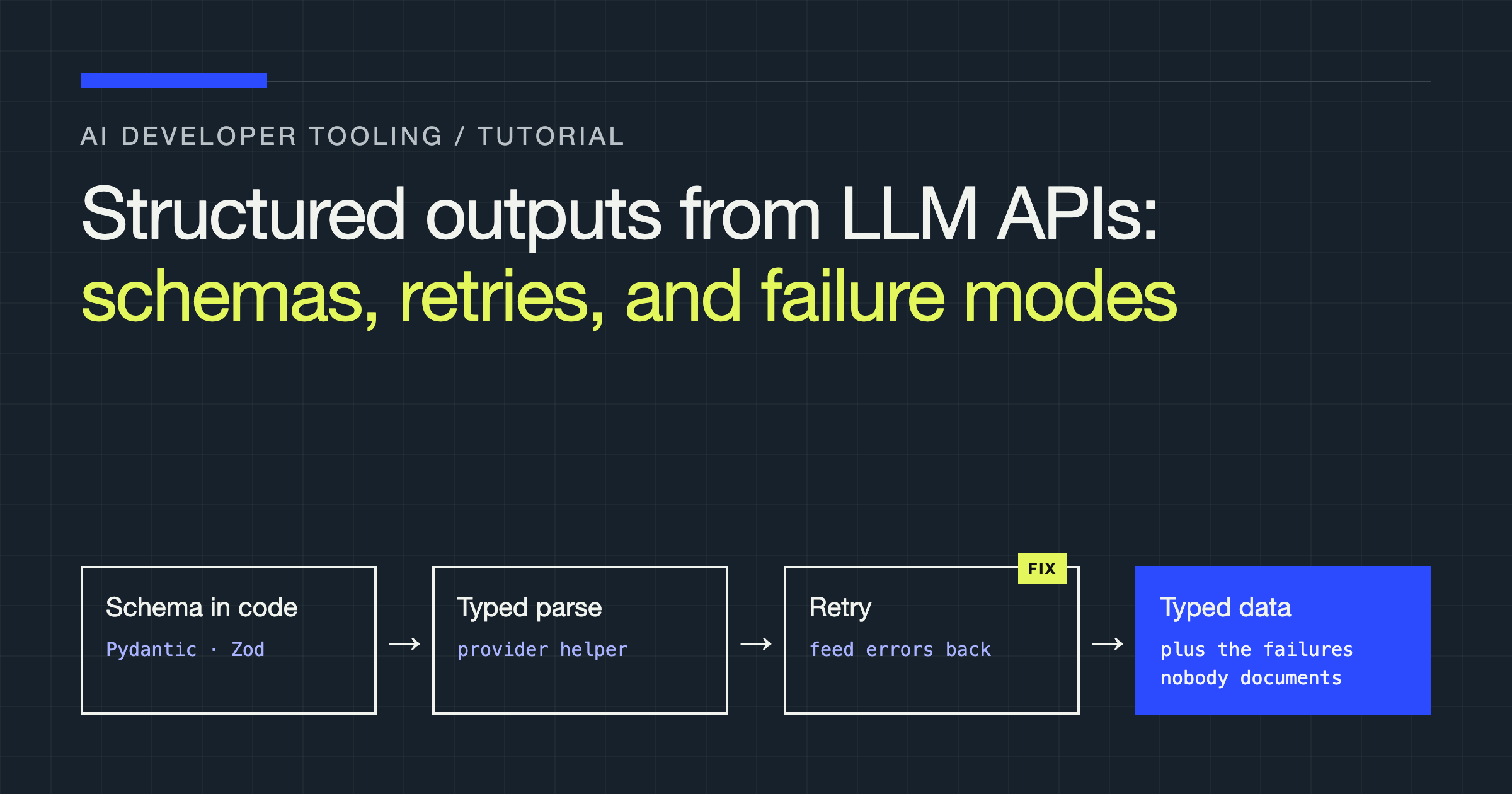
You will build a typed extraction pipeline that pulls a structured record out of unstructured text using an LLM API, validates it against a real schema, and retries intelligently when the output is unusable. Along the way you will meet the failure modes that survive naive implementations: truncated JSON, refusals delivered where data should be, schema features the API silently ignores, and enums the model invents values for anyway.
The core idea to hold onto: a schema is a request, not a guarantee you can skip validation for. The APIs have become genuinely good at producing schema-shaped output, and that is exactly why the remaining failures are dangerous. They are rare, weird, and they arrive precisely when your input data is unusual, which is when you most needed the extraction to work.
The three mechanisms, and what each actually guarantees
There are three common ways to ask a model for structured data, and they are not interchangeable.
| Mechanism | How it works | What you actually get |
|---|---|---|
| Prompting for JSON | You describe the format in the prompt | A suggestion. Output may include prose, fences, or missing keys |
| JSON mode | API guarantees the output is valid JSON | Valid JSON syntax, any shape at all, possibly {} |
| Strict schema mode | You pass a JSON Schema; decoding is constrained to it | Output matching the schema, within the supported subset of JSON Schema |
| Tool calling | The model “calls” a function you defined | Arguments matching the tool’s parameter schema; doubles as an action |
Strict schema mode is the right default for extraction: the provider constrains generation so the response conforms to your schema, which removes whole categories of parse errors. But note the qualifiers. Only a subset of JSON Schema is supported. In OpenAI’s strict mode, for example, every object must set additionalProperties: false, all properties must be listed in required, and keywords like minimum, maxLength, or pattern are not enforced even if you write them. A schema that type-checks in your editor may be rejected by the API, or worse, accepted with the constraints you cared about quietly dropped.
Tool calling gives you the same schema discipline with a different failure profile, and on some providers it is the only structured route. Its quirk: the model may simply decline to call the tool and answer in prose instead, so your code must handle “no tool call” as a normal outcome, not an exception you never expected.
Step 1: Define the schema in code, not in a string
Define your shape with Pydantic (or Zod, if you live in TypeScript) and let the library generate the JSON Schema. Hand-written schema strings drift away from the types your code consumes; generated ones cannot.
from pydantic import BaseModel, Field
from typing import Optional


class LineItem(BaseModel):
    description: str
    quantity: int
    unit_price_cents: int


class Invoice(BaseModel):
    vendor: str
    invoice_number: str
    currency: str = Field(description="ISO currency code, e.g. USD")
    items: list[LineItem]
    total_cents: Optional[int] = Field(
        default=None,
        description="Stated total, if the document shows one",
    )
Notice total_cents is optional in your Python model. Under strict schema rules, optional does not exist: every field must be required, and optionality is expressed by allowing null in the type. Good client libraries handle that translation for you; if you hand-roll the schema, this is the first place your request will be rejected or your semantics will change without you noticing.
Step 2: Parse with the provider’s typed helper
Modern SDKs will deserialize into your model and surface the awkward outcomes as distinct cases. Handle all three branches every time:
from openai import OpenAI

client = OpenAI()


def extract_invoice(text: str) -> Invoice:
    completion = client.beta.chat.completions.parse(
        model="gpt-4o",
        messages=[
            {"role": "system",
             "content": "Extract the invoice fields from the document. "
                        "Use null for any field the document does not state."},
            {"role": "user", "content": text},
        ],
        response_format=Invoice,
    )
    message = completion.choices[0].message
    if message.refusal:
        raise ValueError(f"Model refused extraction: {message.refusal}")
    if message.parsed is None:
        raise ValueError("No parsed output returned")
    return message.parsed
The refusal branch matters more than it looks. Invoices are benign, but real pipelines extract from user-generated text, support tickets, and contracts, and some fraction of that input trips safety behaviour. If your code treats a refusal as an empty object, you have converted a loud failure into silent data corruption downstream.
Step 3: Retry like you mean it
Even with strict schemas, things fail: the API call times out, the output is cut off, or the parsed values fail your own business validation (a total that does not match the line items, a currency code that is not a real code). A useful retry loop has three properties:
- It feeds the error back. “Try again” produces the same mistake. Appending the validation error and asking for a correction gives the model something to fix.
- It distinguishes failure classes. A timeout is retried as-is. A validation failure is retried with feedback. A refusal is not retried blindly at all; it goes to a dead-letter path for a human, because the model has told you it will not do this input.
- It stops. A small fixed number of attempts, then a structured failure your caller can handle. Infinite retries against a deterministic failure are how pipelines hang at 3 a.m.
from pydantic import ValidationError


def extract_with_retry(text: str, parse_fn, max_attempts=3):
    feedback = None
    for attempt in range(max_attempts):
        try:
            raw = parse_fn(text, feedback=feedback)
            return Invoice.model_validate(raw)
        except ValidationError as e:
            feedback = (
                "Your previous output failed validation with these errors:\n"
                f"{e}\nReturn a corrected object only."
            )
raise RuntimeError("Extraction failed after all attempts")The failure modes nobody documents
Schema-valid, world-invalid. Strict mode guarantees shape, not truth. An enum field constrains values only if you define the enum; a free string field will happily contain a currency code that does not exist, a date in the wrong format family, or an id copied from the wrong line of the document. Your validation layer, ranges, cross-field checks, lookups against real reference data, is not optional decoration. It is the part that catches the errors the schema cannot see.
Silent constraint dropping. If you generate your schema with one tool and send it to an API that supports a subset, unsupported keywords may be ignored rather than rejected, depending on the provider and the mode. The practical defence: validate the output against your full schema locally, with every constraint enforced, even though the API “already did”. The local pass is cheap; the bug it catches is not.
Partial objects while streaming. If you stream structured output, you will hold invalid JSON for almost the entire response. Partial-parse libraries can show a progressively filled object, but never act on intermediate values: fields appear in schema order, so a streamed object looks complete long before it is. Trigger side effects only on the final, validated object.
Depth and size limits. Deeply nested schemas, very large enums, and schemas with many optional branches all push against provider limits, and the error you get back is not always a clear “schema too complex”. Keep extraction schemas shallow, split one giant extraction into two passes over the same text, and prefer several small typed calls to one enormous one when the document has independent sections.
The model negotiates. Given an ambiguous document, models smooth over gaps with plausible values instead of nulls, especially in fields your prompt describes casually. Fight this in the field descriptions: “Use null if not stated; never infer” belongs in the schema description of every nullable field, not buried in the system prompt.
| Failure | Signature in your logs | Fix |
|---|---|---|
| Truncation | Finish reason is length; JSON ends mid-string | Raise output budget, shrink the extraction target |
| Refusal | Refusal field set, no parsed object | Dead-letter for review; do not substitute an empty object |
| Schema subset gap | Output violates a constraint you wrote | Validate locally against the full schema |
| Plausible invention | Valid shape, wrong values, nulls avoided | Null-friendly field descriptions; cross-field checks |
| No tool call | Prose answer where arguments belong | Handle as a first-class outcome; force the tool if the API allows |
Verdict
Use strict schema mode where your provider offers it, define the schema in code with Pydantic or Zod, parse through the SDK’s typed helper, and then behave as if none of that happened: validate locally, check the finish reason, handle refusals explicitly, and retry validation failures with the error fed back, a fixed number of times. Structured output has genuinely removed the “the JSON had a trailing comma” era of failures. What remains is subtler: well-formed data that is quietly wrong. Build for that, and your extraction pipeline will fail loudly and rarely instead of silently and often.